
AI guidance layer for the browser
Support that appears on the screen, not on the phone.
helperflow reads the page your user is actually looking at and draws the next step right on top of it. No screen sharing, no tickets, no video tutorials — guidance in seconds, in any browser tab.
Free plan included · Works on any website · No screen recording
- Published in the Chrome Web Store
- Tested in SAP, Plesk & WordPress environments
- No video recording, no data retention
- Engineered in Freiburg, Germany
Open System Settings in the left sidebar.
Enter the account name in the highlighted field.
Confirm with Save — you’re done.
01 / Benefits
Why guidance beats documentation.
Manuals go stale, videos never match the user’s screen, and remote sessions cost a person on both ends. helperflow removes all three.
Nothing to integrate
No SDK, no script tag, no cooperation from the software vendor. If it runs in Chrome, helperflow can guide it — including tools you only use, but don’t own.
Live, not scripted
Classic product tours are recorded once and break on the next release. helperflow reads the current state of the interface every single time, so a redesign doesn’t invalidate it.
Plain language in
Users don’t need to know the vocabulary of the application. They describe the outcome they want; helperflow works out the path through the menus.
One step at a time
Instead of a wall of instructions, the user gets exactly the next action, highlighted where it happens — the pattern that makes people finish tasks instead of abandoning them.
Rollout in minutes
Individuals install it from the Chrome Web Store. Organisations distribute it centrally through managed-Chrome policy with a licence key — no client software, no infrastructure.
Costs you can predict
Usage is credit-based and metered per request, with a free tier to start. No per-agent support seat, no minimum term, no hidden onboarding fee.
02 / In practice
The same problem, two very different paths.
Every organisation already has a way of dealing with “I don’t know where to click”. It usually costs two people and an afternoon.
Without helperflow
- The user gets stuckSomewhere in a menu, a form or a setting nobody documented.
- A ticket, a call, a colleagueThe task stops and waits for someone else to become available.
- Screen sharing or a remote sessionTwo people, one screen, scheduling — and control handed over.
- Solved once, forgotten twiceNothing is learned, so the same question comes back next week.
With helperflow
- The user gets stuckSame moment, same screen, same frustration.
- They ask in the tab they’re inOne click, plain language, no ticket and nobody else’s calendar.
- The next step lights up on the pageHighlighted where it happens, one action at a time.
- Task finished — and understoodThe user did it themselves, so the second time they don’t need help.
// No screen sharing. No remote control. No recording of what happened.
03 / Use cases
Wherever people get stuck in a browser.
helperflow runs across many tabs in parallel, so one installation covers every application a person touches during the day.
 01SaaS onboarding
New users reach their first success without a demo call — guidance inside the product instead of a knowledge base nobody opens.
 02Internal tools & admin panels
Homegrown back-office software rarely has documentation. helperflow explains it live, without anyone writing a manual first.
 03IT support & service providers
Replace a share of remote sessions: the user is guided on their own screen instead of waiting for a technician to take over.
 04ERP, CRM & finance systems
Deep menu trees in systems like SAP, CRM suites or server panels — helperflow finds the path instead of the user hunting for it.
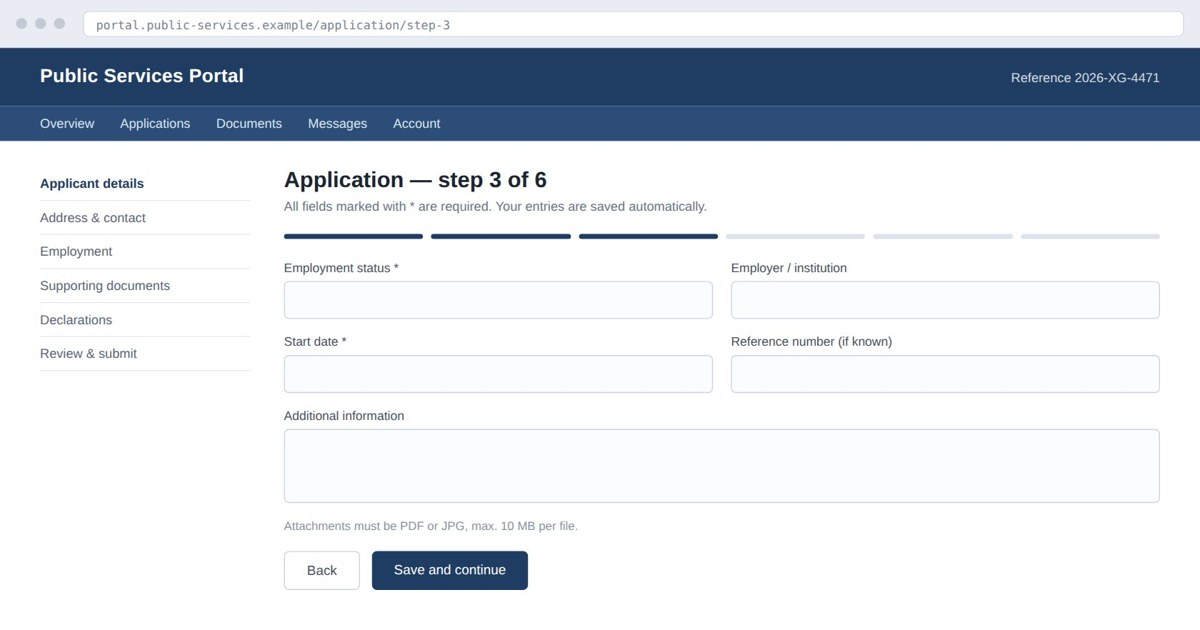 05Forms, portals & public services
Complex applications and official portals become answerable step by step, in the applicant’s own words.
 06Learning new software
Employees learn by doing the real task, in the real system, at the moment it matters — not in a training session three weeks earlier.
04 / Security & privacy
Built to be defensible in a security review.
helperflow is a guidance tool, not a monitoring tool. It never takes control of the machine and never builds a record of what a user did.
The active tab
Only the tab the user explicitly asks for help in — never the whole browser, never the desktop.
Minimum context
The page is reduced to the context needed to answer this one question, then sent — nothing more.
Model request
A language model derives the next step. The request is transient and is not used to train models.
Answer, then forget
The step is drawn on the page. After the response, the context is gone — not stored on our servers.
- No screen or video recording. There is no session replay and no footage to leak, subpoena or store.
- No remote control. helperflow shows the user what to do; the user stays in charge of every click.
- Processed temporarily, not retained. Page context lives for the duration of the request and is not kept on our servers afterwards.
- On demand only. Nothing happens until the user opens helperflow and asks — it does not watch in the background.
- No profiling, no data sale. User data is never sold and never used to build behavioural profiles.
- Operated from Germany. Backend and company are based in Freiburg im Breisgau — one accountable operator, not a chain of resellers.
05 / Pricing
Start free. Upgrade when it saves you time.
Usage is credit-based: every guided request consumes credits depending on its complexity, so you only pay for guidance you actually use.
Free
For trying helperflow on your own everyday tasks.
- Included monthly credits
- Full guidance on any website
- Runs across parallel tabs
- No credit card required
Pro
For people who work in software all day and want guidance always available.
- Everything in Free
- Substantially higher credit allowance
- Priority processing
- Email support
- Monthly, cancel any time
Business
For teams that want helperflow rolled out centrally and billed per seat.
- Central rollout via managed-Chrome policy
- Licence key instead of individual logins
- Tenant-level quota & seat reporting
- Security overview for your IT review
- Direct line to the engineering team
A seat is counted per installation and calendar month. Prices excl. VAT where applicable.
06 / Technology partners
Put guidance inside your own product.
helperflow is a guidance layer, not a destination. It can run under your brand, on your application, for your users — and we build the integration together with a small number of partners per year.
- 01Software vendorsShip in-product guidance without building an onboarding team — your users get help on your UI, in your name.
- 02IT service providers & MSPsOffer guided support as a service across your clients’ web applications, with per-tenant quota and reporting.
- 03Enterprises with managed ChromeRoll out to the workforce by policy and co-develop guidance for the internal stack nobody else can support.
07 / FAQ
Questions people ask before installing.
How does helperflow work?
Is my data safe?
- Page content is processed only temporarily, for the current request
- It is not stored on our servers after the request
- We do not sell user data and do not build user profiles
- Only the minimum context required is sent to the AI provider
Is helperflow free?
How does pricing work?
What can I use helperflow for?
What makes helperflow different from tutorials or product tours?
Does helperflow work on all websites?
Can helperflow automate tasks for me?
Is helperflow suitable for businesses?
Which AI does helperflow use?
Get started
Try it on the page you’re stuck on.
Install helperflow, open the tab that’s giving you trouble, and ask. The free plan is enough to see whether it changes how your team works.
Free plan included · No credit card · Uninstall in one click
